Transform Photos with Natural Language
using Firered Image Edit
Firered Image Edit is an open-source AI image editing model that understands your instructions. Restore old photos, edit portraits, transfer styles, and compose multi-element images — all from a simple text prompt.
Need unlimited generations and faster processing?
Get priority access, batch processing, and commercial licensing on MixVid.
The Open-Source AI Editor That Follows Instructions
Most AI image tools generate images from scratch. Firered Image Edit works differently. You provide an existing photo and a text instruction describing what to change, and the model makes that precise edit while preserving everything else — identity, composition, lighting, and texture.
Firered Image Edit is built on a powerful foundation model that achieves open-source state-of-the-art performance across photo restoration, portrait editing, multi-image composition, and text-guided style transfer. It understands complex instructions and delivers high-fidelity results.
Whether you need to restore a vintage family photo, change a portrait background, apply makeup effects, or fuse elements from multiple reference images — Firered Image Edit handles it all through a single, unified model with superior identity consistency.

What Firered Image Edit Can Do
Photo Restoration
Restore old or damaged photos with Firered Image Edit. Repair scratches, enhance faded details, and upscale low-resolution images without the artificial plastic look common in other tools.
Multi-Image Composition
Combine elements from multiple reference images into one cohesive output using Firered Image Edit. Upload people, objects, or styles and describe how to merge them naturally.
Portrait Editing & Makeup
Firered Image Edit optimizes portrait consistency and supports makeup effects, hairstyle changes, and facial adjustments while preserving the subject identity across edits.
Precise Instruction Following
Describe your edit in plain English and Firered Image Edit executes exactly what you ask. Change backgrounds, swap outfits, add accessories — the model understands your intent.
Text & Typography Preservation
Edit text in images while maintaining font style, shadows, and texture. Firered Image Edit achieves text fidelity comparable to closed-source commercial solutions.
Style Transfer & Fusion
Apply artistic styles from reference images to new scenes with Firered Image Edit. Extract lighting, color grading, and texture from one image and blend it into another.
Edit Any Image
in Seconds
Upload Your Image
Drag in any photo you want to edit — portraits, landscapes, product shots, old family photos.
Describe Your Edit
Write what you want to change in plain English. Be as specific or as creative as you like.
Get Your Result
Firered Image Edit processes your request and generates the edited image. Download and iterate.
"Restore this old photo: remove all scratches, enhance the colors, and sharpen the faces while keeping the original composition"
What You Can Create
with Firered Image Edit
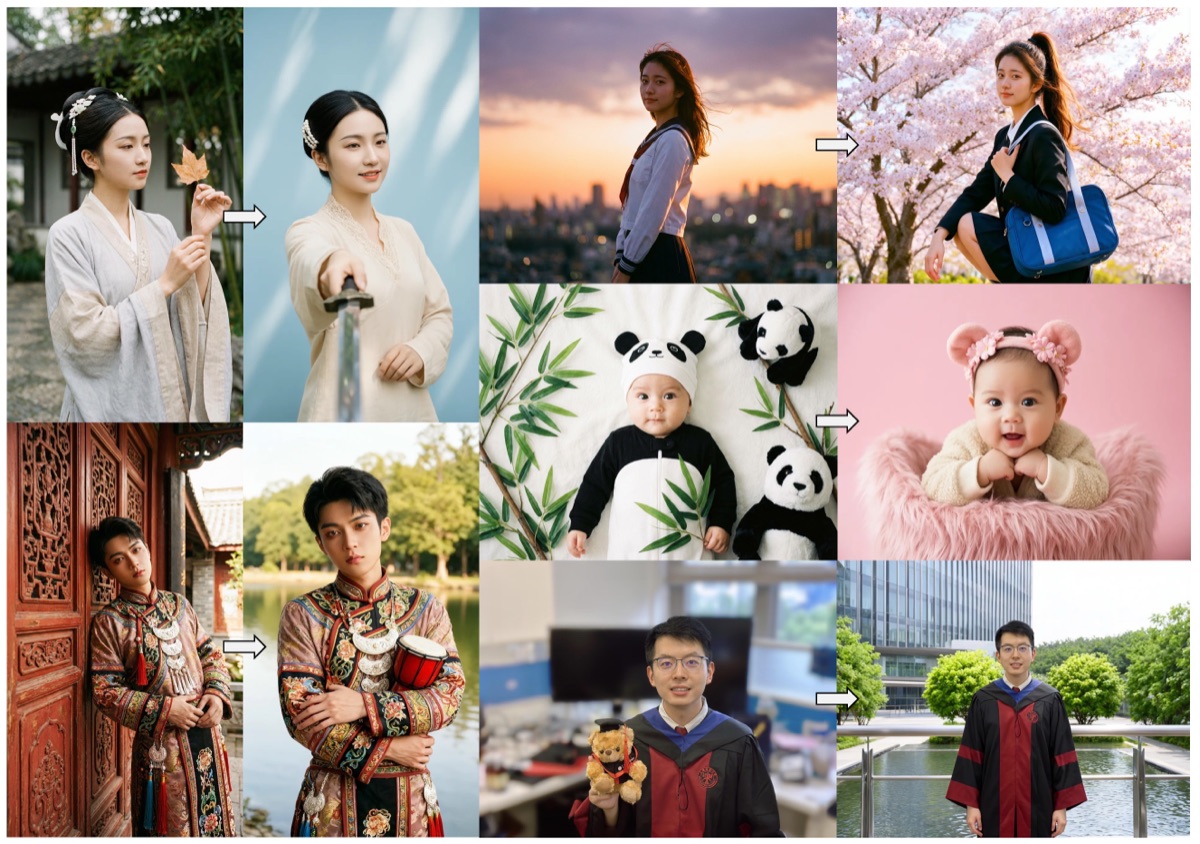
Portrait Editing
Edit portraits with precise identity consistency. Firered Image Edit changes hairstyles, backgrounds, and styles while preserving the subject perfectly.
Photographers & creators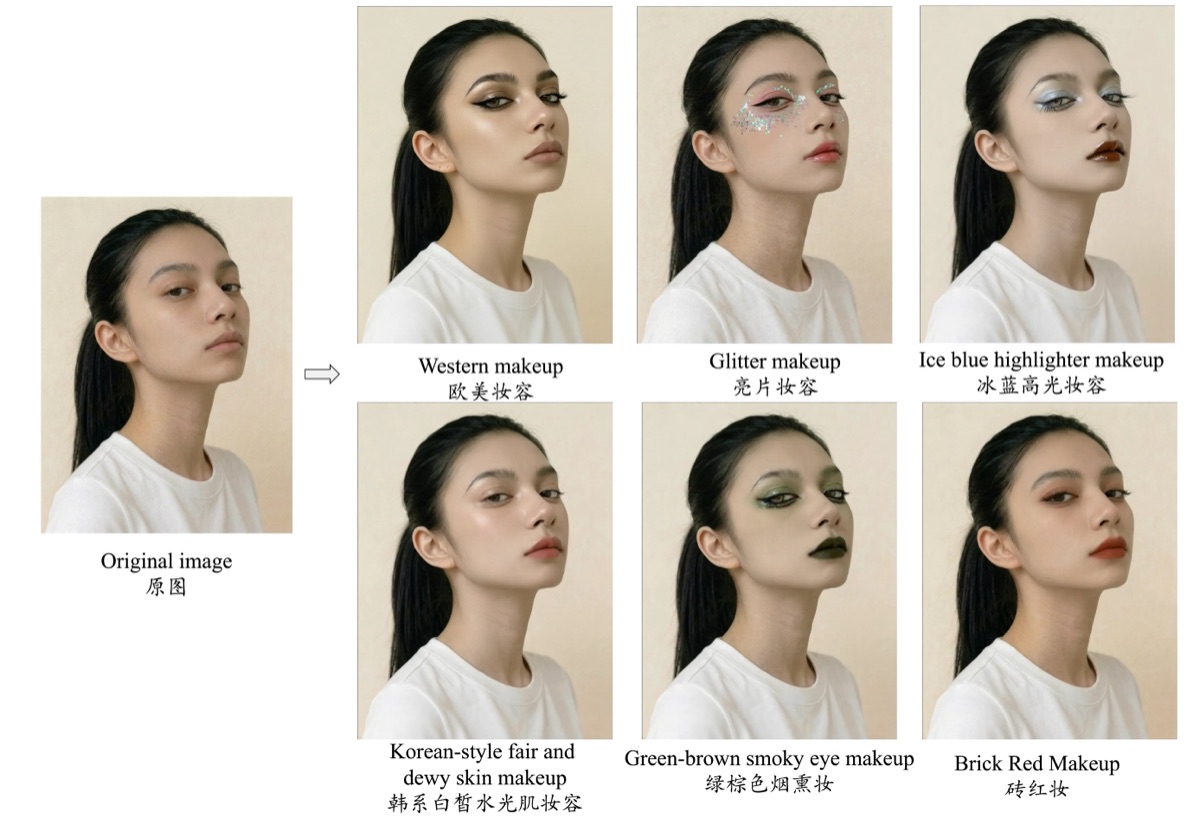
Makeup & Style Effects
Apply makeup effects, change facial features, and transform styles. Firered Image Edit handles beauty transformations with natural-looking results.
Beauty & fashion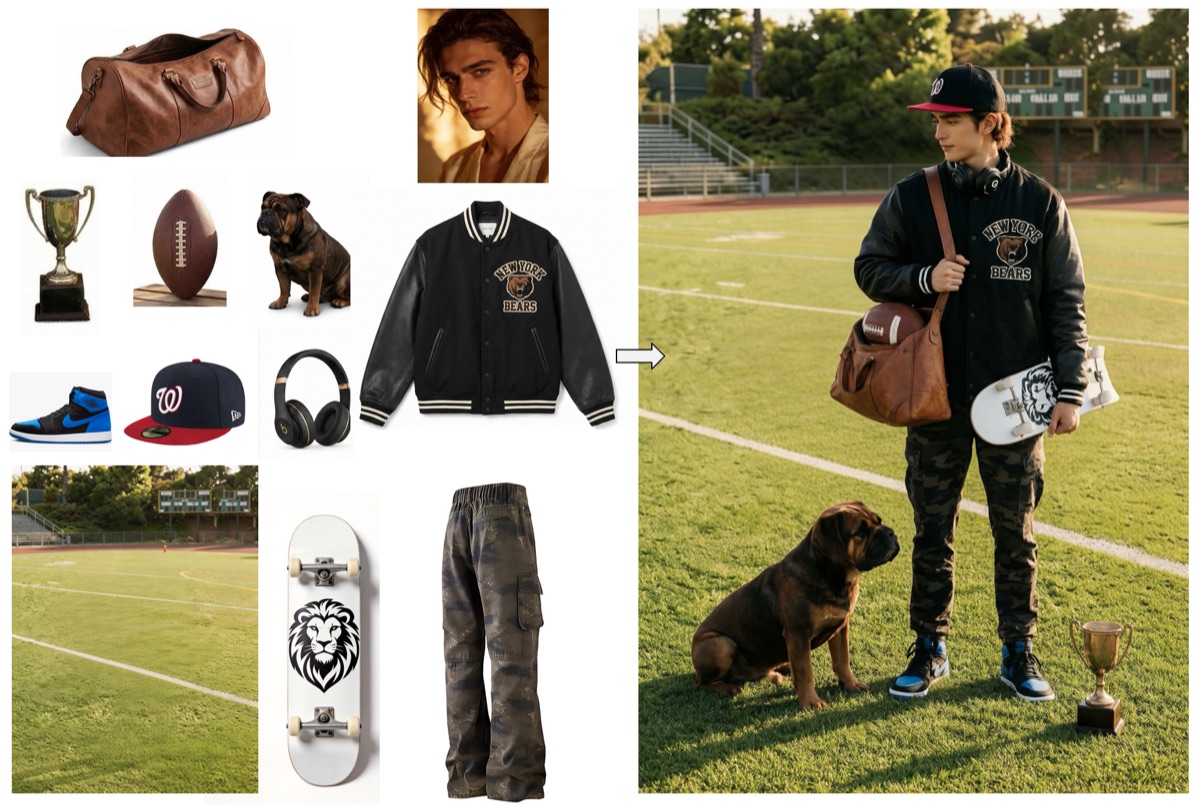
Multi-Element Fusion
Combine elements from multiple source images into a single cohesive result. Firered Image Edit intelligently merges people, objects, and styles.
Designers & marketersCommon Questions About
Firered Image Edit
What is Firered Image Edit?
Firered Image Edit is an open-source AI image editing foundation model that achieves state-of-the-art performance. It supports precise instruction following, high-fidelity generation, superior identity consistency, and seamless multi-element fusion — making it one of the most versatile AI image editors available.
Is Firered Image Edit free to use?
Yes, the Firered Image Edit demo on this page is completely free with no sign-up required. You can start editing images immediately — upload your photo, type your instruction, and let Firered Image Edit generate the result. For unlimited generations and faster processing, visit MixVid.
What types of edits can Firered Image Edit handle?
Firered Image Edit can handle photo restoration, portrait editing, background changes, makeup effects, multi-image composition, style transfer, text editing in images, object addition or removal, and complex multi-element fusion — all through natural language instructions.
How does Firered Image Edit compare to other AI image editors?
Firered Image Edit achieves open-source state-of-the-art performance across multiple editing benchmarks. It excels particularly in identity consistency and multi-element fusion, areas where many other AI image editors struggle. The model preserves fine details better than most alternatives.
Can I use Firered Image Edit for portrait photos?
Absolutely. Firered Image Edit has been specifically optimized for portrait consistency. You can change hairstyles, apply makeup, adjust lighting, modify backgrounds, and even transfer a person into a different scene — all while keeping their facial features and identity perfectly intact.
What image formats does Firered Image Edit support?
Firered Image Edit supports all common image formats including JPG, PNG, and WebP. Simply upload your image to the demo, describe the edit you want in natural language, and Firered Image Edit will process your request and generate the edited result.
Unlimited Firered Image Edit
on MixVid
The free demo has shared capacity limits. For unlimited Firered Image Edit generations, faster processing, batch editing, and commercial use — upgrade to the full MixVid platform.